


Windrock Park
2.680.00 Reviews
App Specs
- Version
- 2.0.3
- Updated On
- License
- Free
- Downloads
- 10,000+
- Developer
- Windrock Properties, LLC
- Categories
- Travel & Local
- Platform
- Android
Screenshots
 Analysis by AppCompare
I would treat Windrock Park as a shared trip-planning aid, not as a substitute for deciding together what the day should involve. On a household outing, one person can look over the park’s trails while another checks what sounds manageable, then the group can agree on a route before leaving. That small conversation matters: different passengers may have very different ideas of a fun drive, and a trail’s difficulty is more useful when everyone understands what it means for the people and vehicles making the trip.
That makes the app most appealing to people who already have a concrete reason to visit Windrock Park. It can help turn “let’s go exploring” into a more considered plan, especially for friends or relatives who want to compare trail information before setting out. I would be less inclined to install it just to browse generic outdoor destinations; its value is tied to this particular park, rather than to trip discovery across many places.
Decide how the phone will be used before the trip
On a shared device, I’d agree in advance who is responsible for opening the map and checking the route. That avoids passing a phone around while people are trying to focus on the drive, and it keeps route decisions from becoming a last-minute group debate. If each person uses a separate device, it is still worth agreeing which map or route is the group’s reference point. Multiple people looking at different screens can create confusion rather than extra security.
I’d also make the practical checks part of the preparation, not something left until the vehicle is already at the trailhead. If you intend to rely on an offline map, prepare it while you have connectivity and confirm that the relevant map is available on the device you’ll actually bring. A download on one person’s phone does not help a passenger whose phone has no saved map. Keeping a paper backup or another reliable navigation option is sensible for a remote outing, since a phone app should not be the only plan for finding your way.
Account access deserves a little thought on a family or shared phone. A sign-up step may mean that one person’s account becomes the practical home for saved information or community activity. I would use an account managed by the adult who organizes the trip, rather than casually sharing credentials or letting everyone make changes without a plan. That is not a special family-control feature; it is simply a clearer way to keep responsibility and trip decisions in one place.
Coordinate without assuming everyone wants the same ride
Windrock Park’s trail difficulty labels and community reviews can support a useful conversation before anyone commits. I’d have the group compare a couple of plausible choices, then consider the least experienced participant instead of letting the most confident driver set the pace. Reviews and photos can add context, but they are other visitors’ impressions, not a guarantee that a trail will feel easy or suitable on a particular day.
A realistic use would be a weekend visit where one person wants a challenging drive and another is bringing a passenger who would rather have a calmer outing. Instead of deciding at the park entrance, the group can review the available trail information beforehand and settle on an option everyone can accept. If the group cannot agree, splitting up is not automatically the best answer: separate vehicles need their own navigation and a clear plan to regroup. The app may help people discuss choices, but it cannot make those choices for them.
Worth Reading Before You Choose

Baby Panda World Brings Quick Play to Modern Phones, but Its Game Library Feels Busy

ESPN’s Live Game View Makes Following Close Games Easier

QuizzLand Review: A Good Fit for Short Trivia Breaks, Not Every Player

Basketball Stars: Multiplayer Is Fast, but Can It Recover When Matches Go Wrong?

WEBTOON Turns Phone Updates Into a Better Reading Routine

Link to Windows Runs on Shared Habits, Not Social Feeds
The community feature may be useful for sharing experiences or arranging contact with fellow outdoor enthusiasts, but I would keep personal details and meet-up plans deliberate. For a household trip, a direct agreement among the people going is a more dependable coordination method than assuming a social post will reach everyone or settle logistics. Treat shared photos and comments as trip context, not as official instructions.
Age, trust, and realistic expectations
The app is rated for Everyone, which makes its general audience broad, but that label does not answer whether a particular child is ready to use a phone outdoors or take part in trail decisions. I’d keep navigation and account responsibility with an adult, especially when the outing involves remote terrain. Children can still help compare pictures or talk about what they would like to see; the adult should make the final call on route and safety.
There is also a trust distinction worth keeping in mind: a map, GPS position, weather information, and visitor reviews serve different purposes. A GPS track can show where the phone has gone, while a review describes somebody else’s experience. Neither one guarantees that conditions are unchanged. I would check the day’s circumstances with suitable current sources and use the app as one part of preparation, not as a promise that every route is safe or open.
Who gets the most from it—and who may prefer another tool
Windrock Park is a focused option for visitors who want park-specific trail exploration, including off-roaders who value route context and groups that like to plan together. Its offline-map and GPS functions are especially relevant when reception may be unreliable, provided the map is prepared ahead of time and the phone remains usable. The app is free to install, although it includes in-app purchases priced from $9.99 to $19.99 per item, so I would check what an optional purchase covers before paying rather than assuming every useful function is included at no cost.
For someone choosing between this and a general navigation app, the trade-off is specialization. A broad map is often better for driving to a destination or handling ordinary road navigation; a park-focused app is more relevant when trail details are the point of the visit. I would not rely on Windrock Park alone for every part of a long journey, and I would not choose it as a general hiking guide for unrelated locations. Keeping a familiar road-navigation option for the approach and this app for park planning is a more sensible division of work.
There are reasons to be cautious, too. The average rating is 2.6 from 106 ratings, with 79 reviews, so I would not treat the enthusiastic description of its features as proof that every visitor will have a smooth experience. The app has 10K+ installs, but popularity by itself does not settle whether it will suit your phone or your plans. Windrock Park is free, rated Everyone, and developed by Windrock Properties, LLC; its current version is 2.0.3, and it requires Android 7.0 or later. Those details help with a basic compatibility check, but I’d still install and inspect it before building a trip around it.
Getting Started with Windrock Park
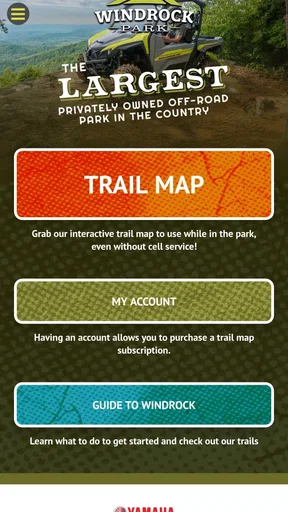
The first thing you'll notice when you fire up Windrock Park is its user-friendly interface. It’s like having a tour guide in your pocket. The app is available for both Android and iOS, so you can download it from the Google Play Store or Apple App Store. Once you have it installed, you're greeted with a sleek design that’s easy to navigate, even if you’re not the most tech-savvy person out there.
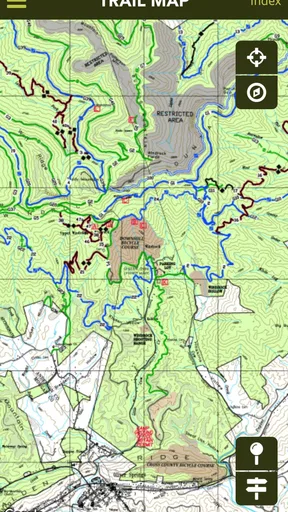
After a quick sign-up process, you're ready to explore. The app offers a map view that’s incredibly detailed. Whether you're planning a day trip or a weekend getaway, it gives you access to over 300 miles of trails. And the best part? You can download maps for offline use. So, even if you find yourself in a no-signal zone, you're never lost.
The Features That Stand Out
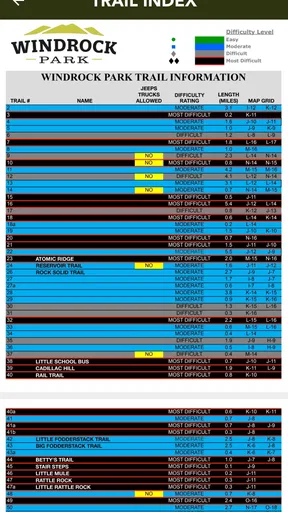
What makes this app really shine are its features. First off, the trail information is top-notch. Each trail is categorized by difficulty, and users can leave reviews and photos. This is super helpful if you're trying to decide which trail to tackle next. Trust me, those user reviews can save you from biting off more than you can chew!
The GPS tracking is another highlight. It's precise and reliable, ensuring you can keep track of your progress in real-time. No more wandering off the beaten path unless, of course, that's what you're into. Plus, there’s an option to track your stats like distance traveled and elevation gain, which is great if you're competitive with yourself or friends.
For those who love a bit of social interaction, there's a community feature where you can connect with other adventurers. Share your experiences, swap stories, or even plan a meet-up. It’s like a virtual campfire chat with fellow outdoor enthusiasts.
Why It’s Worth Downloading
Now, you might be wondering, "Do I really need another app on my phone?" Well, if you're an outdoor lover, the answer is a resounding yes. Windrock Park is not just an app; it’s an experience. It takes the guesswork out of exploring and makes it easier to enjoy nature responsibly.
The app also keeps you informed with real-time weather updates and alerts. This is crucial if you're planning to hit the trails, as mountain weather can be unpredictable. Plus, there’s an events section that keeps you in the loop about any upcoming activities or gatherings happening in the park.
Final Thoughts
Windrock Park is a must-have for anyone who enjoys the thrill of adventure and the beauty of nature. It’s like having a multi-tool in your backpack—versatile, reliable, and always handy. Whether you're a seasoned off-roader or a weekend hiker, this app enhances your outdoor experiences tenfold.
So, if you're ready to explore without the risk of getting lost or missing out on hidden gems, give Windrock Park a try. It packs a punch with its features and makes the wilderness feel a little more like home. Happy trails!
My practical recommendation is to use it before and during the outing in different ways: do the browsing and route discussion at home, then keep the on-trail phone use brief and purposeful. That split makes the map more useful without turning the trip into a screen-led activity. You can also decide in advance who will check weather information and who will keep an eye on the group, rather than expecting one person to navigate, coordinate, and supervise everyone at once.
For a household deciding whether to install it, I’d start with the person who is actually planning a Windrock visit. They can assess the interface, account setup, and any purchase prompts before others depend on it. If the app fits the group’s needs, it can become a shared reference for choosing trails and talking through expectations. If the household mostly needs ordinary directions, broad destination search, or guidance for outdoor areas elsewhere, a general navigation app or a location-specific alternative may be the better main tool.
Overall, I see Windrock Park as a specialized companion rather than a complete outdoor-safety solution. Its appeal is clearest when the park itself is the destination and the group wants trail information, map access, and a way to keep track of a route. I’d download it ahead of time, test the parts I intend to use, and bring a backup plan for navigation. Used with those boundaries, it can make a shared outing easier to organize; without them, its focused features and mixed user reception make it a less convincing choice for casual or general-purpose use.
Pros
- User-friendly interface for easy navigation.
- Comprehensive trail maps with GPS tracking.
- Frequent updates with new trails added.
- Community features for connecting with riders.
- Offline mode for remote area access.
Cons
- Limited support for non-English speakers.
- Some features require a premium subscription.
- Occasional GPS inaccuracies reported.
- In-app ads can be intrusive at times.
- Battery drain during long trail usage.
FAQs for Windrock Park
What is Windrock Park, and what can I do with this app?
Windrock Park is a comprehensive guide app designed for outdoor enthusiasts visiting the Windrock Park area. The app provides trail maps, GPS tracking, and event schedules. You can use it to plan your adventure, navigate trails, and stay updated on park activities and conditions.
Is the Windrock Park app available for both Android and iOS devices?
Yes, the Windrock Park app is available for download on both Android and iOS platforms. You can find it on the Google Play Store for Android devices and the Apple App Store for iOS devices, ensuring accessibility for all smartphone users.
Do I need an internet connection to use the Windrock Park app?
While some features like real-time updates may require an internet connection, the app is designed to function offline for essential features such as trail maps and GPS tracking. This is particularly useful in remote areas where a mobile signal may be weak or unavailable.
How user-friendly is the Windrock Park app for newcomers?
The Windrock Park app is highly user-friendly, with an intuitive interface that newcomers will appreciate. It includes detailed instructions and a support section to help users navigate its features, making it accessible even to those who might not be tech-savvy.
Are there any hidden costs or in-app purchases in the Windrock Park app?
The Windrock Park app is free to download, but it may offer in-app purchases for premium features or additional content. Users should review the app’s description and permissions before downloading to understand any potential costs associated with the app.


